

As an Amazon Associate I earn from qualifying purchases.
Are you an insurance adjuster or contractor who uses Xactimate? In this article, we will help you find the best laptop for Xactimate to consider right now.
Xactimate is the leading solution when it comes to insurance damage estimates. And with Xactware having fully ended support for Xactimate 28, many users are now required to move to Xactimate X1, which raises an important question:
Do you need a powerful laptop to run Xactimate smoothly today?
In this guide, we’ll walk you through the recommended specs for Xactimate, explain the differences between the available Xactimate versions, and help you choose a laptop that fits your workflow as an adjuster or contractor.
If you’re in a hurry, you can find our top selected laptops for Xactimate below. If the laptop you’re considering isn’t listed and you’re wondering whether it meets the recommended requirements, keep reading.
Quick list: Best laptops for Xactimate in 2026




What is Xactimate®?
Xactimate is a claims estimating software used to estimate building damage, repair, and rebuilding costs. It is widely used by insurance companies, independent adjusting firms, and restoration professionals to generate loss estimates and claim settlement offers.
Xactimate helps claims adjusters speed up the claims process while maintaining accuracy and consistency. While it was initially designed for insurance professionals, many contractors—especially roofing, mitigation, and restoration companies—now rely on Xactimate for negotiations and documentation.
Xactimate is available on three platforms: Desktop, Online, and Mobile.
Xactimate Versions Explained
Desktop (X1)
This version is installed on Windows PCs. It offers the most features, works both online and offline, and syncs with the cloud once an internet connection is available.
Online
Xactimate Online runs directly in a web browser and does not require installation. To use it, you’ll need a Windows PC and a modern browser such as Chrome, Edge, or Firefox.
Mobile
Xactimate Mobile is available for Android and iOS devices. While it doesn’t include all desktop features, it’s very useful for field work such as photos, notes, and basic sketching.
Since this article focuses on finding the best laptop for Xactimate, the recommendations below apply only to Xactimate Desktop (X1) and Xactimate Online.
How to Choose the Best Laptop for Xactimate
Let’s answer the most common question adjusters ask:
What kind of laptop do you actually need for Xactimate?
The good news is that Xactimate is not a very demanding program. You don’t need a gaming laptop or a workstation with a powerful dedicated GPU. However, you do need a laptop that meets modern hardware standards to avoid lag, crashes, or slow syncing—especially with Xactimate X1.
Recommended Laptop Specs for Xactimate (2026)
While Xactimate itself is relatively lightweight, having a modern system makes a noticeable difference in day-to-day use, especially when multitasking.
According to Xactware and real-world adjuster experience, here’s what you should look for today:
Processor:
At least a quad-core processor
(Intel Core i5 / i7 – 11th gen or newer, or AMD Ryzen 5 / 7)
Graphics:
Integrated graphics (Intel Iris Xe / AMD Radeon) are sufficient
Dedicated GPU is not required
RAM:
16 GB of RAM minimum (strongly recommended)
Storage:
SSD only (NVMe preferred)
At least 30 GB of free space
Display Resolution:
Minimum 1920 × 1080 (Full HD)
Internet:
Broadband internet connection for syncing and Online version
Operating System:
Windows 11 64-bit (Windows 10 still works but is being phased out)
These are the official requirements to run Xactimate properly and align with what most insurance adjusters recommend.
Other Important Considerations for Adjusters
As an adjuster, you won’t be running Xactimate alone. Email, Excel, PDFs, photos, and report writing are all part of the job.
A good keyboard matters if you write estimates and emails all day
A larger screen (15–17 inches) improves productivity in Xactimate
14-inch laptops are more portable if you’re often in the field
There’s always a trade-off between screen size, portability, and battery life—so choose based on how and where you work most.
Detailed List: Best Laptops for Xactimate
So, now that you have an idea what to consider when looking for a laptop for Xactimate, let’s check out the top laptops for Xactimate we hand picked for you:
-
Dell Inspiron 15 3000 Series 3511 : Best budget laptop for Xactimate
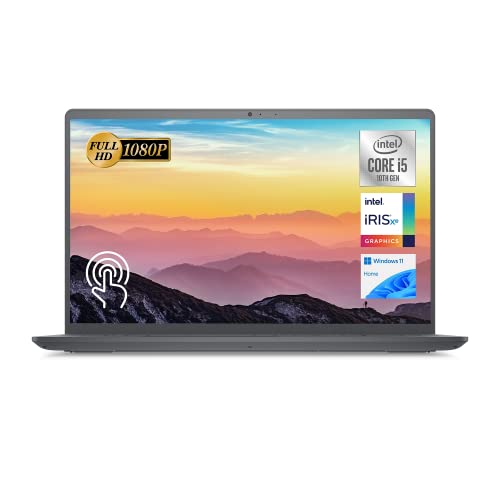

First on our list, we have the Dell Inspiron 3511, which is a reasonably priced mid range laptop that can handle everything an adjuster would need.
The version featured here comes with an Intel Core i5-1135G7 processor, upgraded 32GB RAM, and 1TB of SSD storage.
The Inspiron 3511 has a Full HD 15,6 inch touch display, which will provide enough screen real estate and you won’t need an external display for opening apps side by side or multitasking. And despite its large screen, the Inspiron 3511 is actually quite portable, thanks to its slim design.
In terms of ports, there are 3 USB type A ports, HDMI, and an SD card reader. On the other hand, there is no USB-C or Thunderbolt port, and the keyboard is not backlit.
| Pros | Cons |
| ➕ Relatively Affordable
➕ Good performance ➕ Good battery life |
➖ No USB-C port
➖ Non backlit Keyboard |
-
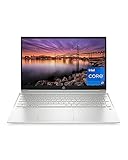
HP Pavilion 15-eg2025nr
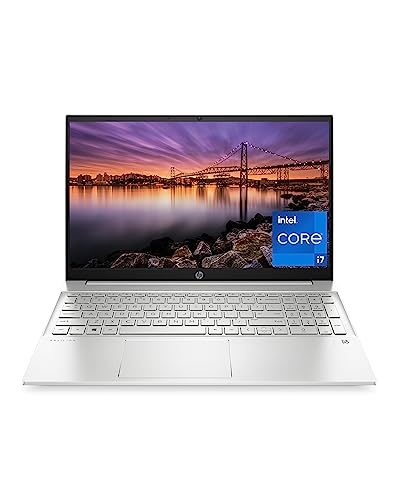
The HP Pavilion 15 is another great mid-range laptop for insurance adjusters. This laptop comes with a 12th gen Intel i7-1255U processor, 16GB of RAM, and a 512GB SSD. Whether you’re dimensioning rooms or adding line items in Xactimate, the Pavilion 15 has enough computing power to handle each task.
The HP Pavilion 15 also comes with a full size backlit keyboard, and a built in fingerprint reader. And as its name implies, the Pavilion 15 comes with 15,6 inch display, with a resolution of 1920 x 1080 pixels.
In terms of ports, there are 3 USB 3.2 type A ports, 1 USB-C port, an HDMI port, and a micro SD card reader. According to the manufacturer, battery life should last about 7h30 , and thanks to fast charging, you can recharge the battery up to 50% of its capacity in about 45 minutes.
| Pros | Cons |
| ➕ Relatively Affordable
➕ Good performance |
➖ Average battery life |
-
Lenovo ThinkPad E15

This list wouldn’t be complete without the Lenovo Thinkpad E15, one of the most popular laptops among professional users, including insurance adjusters. The version featured here combines build quality, performance, to a relatively affordable price tag.
The version featured here comes with a 11th gen Intel Quad-Core i5-1135G7 processor, 16GB of RAM, and 512GB of SSD storage. For office use, the Thinkpad E15 offers a solid performance and will deal with all your Xactimate work with ease.
The E15 also comes with 2 USB type A ports, 1 USB-C/thunderbolt 4 port, HDMI, and RJ45. The backlit is also backlit, and offers and excellent typing experience.
| Pros | Cons |
| ➕ Good performance
➕ Good build quality |
➖ Average display quality |
-
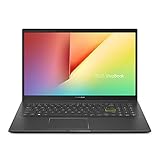
ASUS VivoBook 15 K513
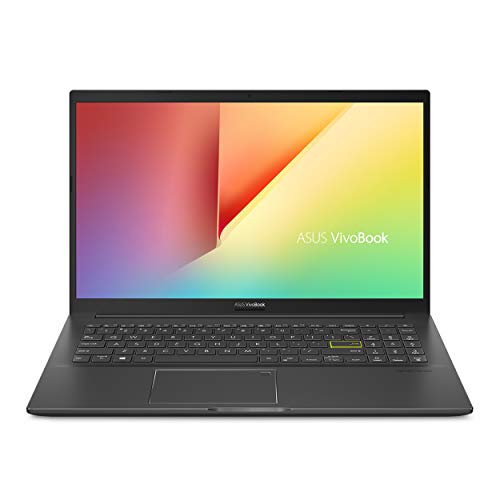
Next, we have the ASUS VivoBook 15 K513. This laptop has an Intel i7-1165G7 processor, 16GB of RAM, 512 GB of SSD storage, and an Nvidia Geforce MX350 graphics card.
The Vivobook K513EQ-PB79 is a mid range laptop that offers plenty of power to handle most daily tasks an insurance adjuster might perform. And thanks to the dedicated graphics card, the Vivobook K513 can also tackle more demanding tasks, such as casual gaming, and video editing.
As for I/O, there are 3 USB type A ports, 1 USB-C port, HDMI, and a micro SD card reader. the keyboard is backlit, and there is a built in fingerprint sensor for enhanced security.
| Pros | Cons |
| ➕ Good performance
➕ Good build quality |
➖ Limited battery life |
-
LG gram 17Z90Q

If you want a laptop with a large display, then you can consider the LG gram 17Z90Q. This laptop comes with a 12th gen Intel i7 1260P processor, 16GB of RAM, and a 1TB NVMe SSD. In terms of performance, the i7 1260P has more than enough power to handle your daily tasks, thanks to its 12 cores, and with 16GB of DDR5 RAM, multitasking and opening other programs while running Xactimate will be smoother than ever.
However, the highlight of the LG Gram 17 is its gorgeous 17 inch display. The screen has a high resolution of 2560 x 1600 pixels and offers professional grade color accuracy, with up to 99% of the DCI-P3 color gamut.
As for ports, the LG Gram 17 comes with 2 USB type A ports, 2 USB-C/thunderbolt 4 ports, HDMI, and a micro SD card reader.
Battery life is also outstanding for a 17 inch laptop, with up to 12,5 hours of moderate use.
| Pros | Cons |
| ➕ Good build quality
➕ Excellent build quality ➕ Excellent display |
➖ Average keyboard |
-
Lenovo IdeaPad Flex 5

If you’re looking for a convertible laptop for Xactimate, then you should definitely consider the Lenovo Ideapad Flex 5. This laptop comes with an Intel i7-1165G7 processor, 16GB of RAM, and 1TB of SSD storage.
The Flex 5 comes with 15,6 inch Full HD IPS display, which supports multitouch and active stylus. In terms of ports, there are 2 USB type A ports, 1 USB-C port, HDMI, and a card reader.
Battery life is also very good, and you can easily get up to 8 hours of use.
| Pros | Cons |
| ➕ Good performance
➕ Good battery life |
➖ Soldered RAM |
-
Lenovo ThinkPad T14 Gen 2

Another great laptop from the Thinkpad series is the Lenovo T14. This laptop is great if you’re looking for a reliable 14 inhc laptop to work on the go. In terms of specs, we have an Intel i5-1135G7 processor, 16GB of RAM, and 512GB of SSD storage.
The T14 offers a solid performance in a compact and well built body. It’s also relatively affordable considering the specs.
The main display is a 14 inch full HD IPS panel, which offers good image quality and good enough brightness level for working outside. and in case you need to connect an external display, the good news is that you can use up to 3 monitors thanks to HDMI and Thunderbolt.
The Lenovo T14 has 2 USB type A ports, 2 USB-C/thunderbolt 4 ports, HDMI and a micro SD card reader. The keyboard is also excellent, and has 1.8mm of key travel.
| Pros | Cons |
| ➕ Good performance
➕ Good battery life ➕ Good connectivity options |
➖ Webcam Quality |
-
MSI Prestige 14

The MSI Prestige 14 Evo is another great 14 inch laptop designed with professional users in mind. The version featured here is model number A11MO-052 which has an Intel i7-1195G7 processor, 16GB of RAM, and 512 GB of SSD storage.
Despite its lightweight and slim design, the MSI Prestige 14 is a workhorse of a laptop, and will handle your daily productivity tasks with no issues.
There are 2 USB-C/thunderbolt 4 ports, 1 USB type A port, and a micro SD card reader. There is no HDMI port and RAM is not upgradable.
| Pros | Cons |
| ➕ Good performance
➕ Slim and Lightweight |
➖ No HDMI port
➖ RAM is not upgradable |
-
Dell XPS 13 9310

The Dell XPS 13 9310 is a premium ultrabook that packs lots of computing power under the hood. This 13,4 laptop has an 11th Intel i7-1195G7 processor, 16GB of RAM, and 512GB of SSD storage.
The design is stunning to say the least, and the laptop is easy to carry around at under 3lbs and 0,58 inch thickness. The screen has a 16:10 aspect ratio, and as expected, image quality is excellent.
In terms of ports, there are 2 USB-C/Thunderbolt 4 ports, and a micro SD card reader.
| Pros | Cons |
| ➕ Good performance
➕ Good battery life ➕ Good display |
➖ Connectivity options |
-
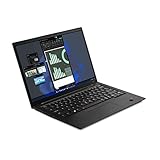
Lenovo ThinkPad X1 Carbon Gen 10

Last but not the least, we have the Lenovo Thinkpad X1 Carbon. The version featured here is gen 10, and comes with a 12th gen Intel i7-1280P processor, 32GB of DDR5 RAM, and 1TB of SSD storage.
The X1 Carbon also has a 14 inch low power IPS touch screen, which helps increasing battery life. Speaking of which, you can easily rely on the X1 carbon for a full day of work, without needing to recharge the battery.
And despite its slim design, the Thinkpad X1 carbon still manages to fit a good number of ports, including 2 USB-C/thunderbolt 4 ports, 2 USB type A ports, and a micro SD card reader.
| Pros | Cons |
| ➕ Good performance
➕ Good connectivity options ➕ Good build quality |
➖ A bit expensive |
Conclusion
These are the top 10 laptops for Xactimate we have selected. Of course, this list will be updated over time. If you have a suggestion, or if you’re interested in a laptop that’s not on the list, feel free to ask us in the comments below.
FAQ
- Can you use Xactimate on a Chromebook?
To use Xactimate, it is recommended to use a computer running Windows. Xactimate cannot run on a Chromebook or Mac computer.
- Can Xactimate run on an iPad?
While you won’t be able to run Xaticmate desktop or online on an iPad, the mobile version of Xactimate is available for Android and iOS devices, including iPads. However, the mobile version does not have all the features available on desktop.
Amazon and the Amazon logo are trademarks of Amazon.com, Inc, or its affiliates.


